Appearance
Counting
New Counting Cycle
Manage Discrepancy
Overview of Unit Movement
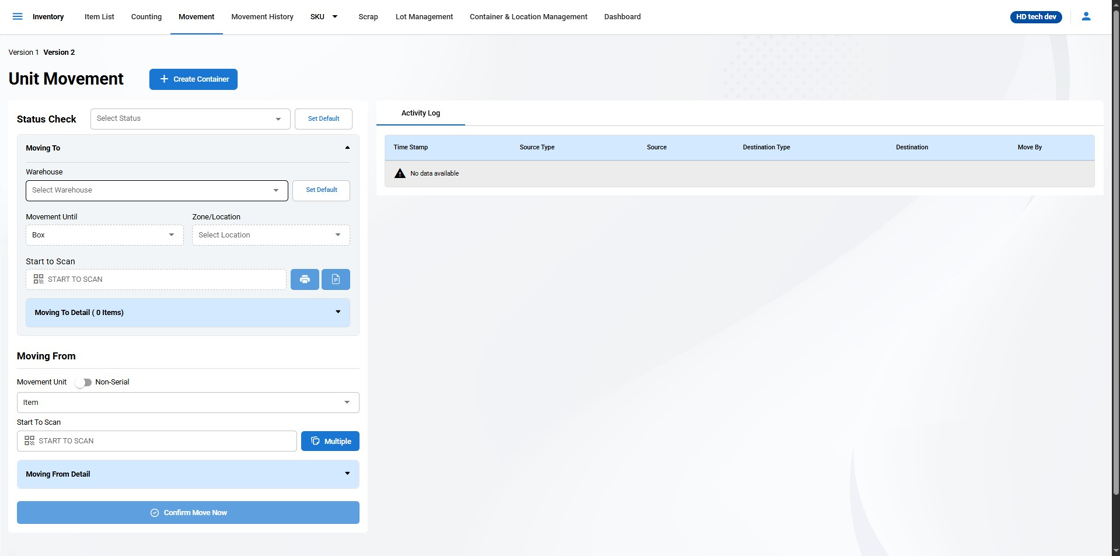
The Unit Movement function in the warehouse management system is an essential tool for maintaining an organized and efficient warehouse. It enables users to relocate inventory items, whether they are pallets, bins, boxes, or individual items, from one location to another within the warehouse. This feature is designed to optimize space usage and streamline the organization of goods.
Key Features of Unit Movement:
Creating a New Container from the Movement Page
On the Movement page, locate the option for creating a new container. This feature appears as a button labeled Create Container.
Selective Movement Options
Movement Unit: Users can select the type of unit to move. The options available are:
Pallet
BIN
Box
Item
Scanning for Location Identification
- Start to Scan: Users can scan the unit number to automatically retrieve its current location within the warehouse, including details of higher location levels that contain the unit.
Detailed Location Display
Location Information: Upon scanning, the system displays the current location details such as:
Warehouse number
Zone/Location
Station/Aisle/Rack
Specific Pallet, BIN, or Box number
Quantity of items within the scanned unit
Movement Direction
- Moving From / Moving To: The interface clearly indicates the direction of the move, from the current location to the new designated location.
Movement Confirmation
- Confirm Move Now: After setting the moving from and to parameters, users can confirm the action to execute the movement of the unit within the system.
By utilizing the Unit Movement feature, warehouse staff can ensure accurate tracking of inventory as it moves within the facility, contributing to better inventory control and operational efficiency.
Activity Log in Unit Movement
The Activity Log is a crucial feature within the Unit Movement section that provides a timestamped record of all movements made within the warehouse. It serves as an audit trail that can be used to track the history of unit relocations and ensure accountability.
Log Details
Each entry in the Activity Log includes:
ID: An identifier for each recorded movement.
Timestamp: The date and time when the movement was executed, displayed in a
MM/DD/YYYY HH;MM:SSformat.Source Type: The category of the location from which the item is moved (e.g., BIN, Box).
Source: The specific identifier or number of the source location.
Destination Type: The category of the location to which the item is moved (e.g., Location, Pallet).
Destination: The specific identifier or number of the destination location.
Move By: The username of the individual who performed the move.
Activity Log (Frontend Only) - Clearing Conditions and History Access
The Activity Log on the Unit Movement page provides a temporary, frontend-only record of inventory movements. It is designed to offer immediate confirmation of recent activities.
Clearing the Activity Log
Please be aware of the following conditions that result in the clearing of the Activity Log:
Closing the Page: When you exit the Unit Movement page or close your browser tab, the Activity Log will be cleared.
Selecting a New Location: Changing the 'New Location' in the 'Moving To' section will also clear the current entries in the log.
Preserving Movement History
While the Activity Log is temporary, all movement records are permanently stored in the system. To access these records:
Navigate to the 'Movement History' page from the Inventory dashboard.
Here you can view all past movements, including those cleared from the Activity Log on the Unit Movement page.