Appearance
Movement History Page
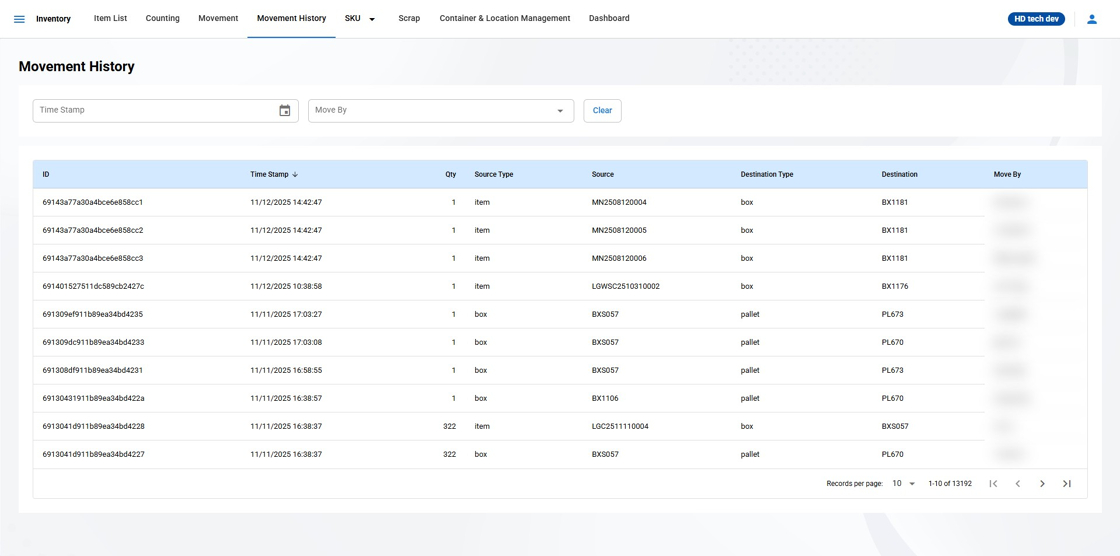
Overview
The Movement History page in the Inventory Management System provides a comprehensive and permanent record of all item movements that have occurred within the warehouse. This section ensures traceability and accountability for inventory transactions over time.
Page Features
Searchable Fields: Users can search the movement records using filters such as 'Timestamp' and 'Move By' to quickly find specific transactions.
Entries Display: The page displays a table with multiple columns, including ID, Timestamp, Source Type, Source, Destination Type, Destination, and Move By.
Historical Data: Unlike the temporary Activity Log on the Unit Movement page, the Movement History page maintains a full record of all past movements, not affected by page refreshes or location changes.
Understanding Movement History Entries
Each entry on the Movement History page represents a completed movement and contains the following information:
ID: A unique identifier assigned to each movement transaction.
Timestamp: The date and time when the movement was logged in the system.
Source Type: The category or type of the starting location (e.g., BIN, Box, Pallet, Item).
Source: The specific identifier for the starting location of the movement.
Destination Type: The category or type of the ending location (e.g., Location, Pallet, Box).
Destination: The specific identifier for the ending location of the movement.
Move By: The username of the user who executed the move, providing an audit trail for the transaction.
Usage Instructions
Use the Movement History page to verify the movement of items for inventory tracking, reconciliation during audits, and historical reference.
To track the journey of a specific item, use the 'Search' function to filter the history by Source or Destination identifiers.
For audit or reporting purposes, data from the Movement History page may be exported if the system provides this functionality.